Review a Replacement for a Discontinued Product With Tasks
A Lubinpla Product Recommendation task reviews a replacement for a discontinued or reformulated product by reading the line's project and work logs. The task compares candidates on one basis, including products you do not carry, shows the sources behind each conclusion, and by default files the proposal only after a person approves it.
When a customer's product is discontinued, the facts the original choice rested on are usually scattered across old visit notes, a maintenance lead's memory and emails from months earlier.
Each maker reports performance in its technical data sheet with its own test methods and units, so replacement candidates cannot be ranked until someone puts their values on one basis.
Under US OSHA, chemical manufacturers and importers must supply an appropriate safety data sheet with the initial shipment, so a hazardous replacement product's SDS has to come with its first delivery (29 CFR 1910.1200(g)(6)(i)).
Lubinpla reviews a replacement as a task that reads the line's recorded conditions, products in use and data sheets, then compares candidates on one basis, including products the supplier does not carry.
On Lubinpla's internal benchmark, the product recommendation task that also runs replacement reviews replied to the customer in about 6 days, against about 22 days for a general AI agent given the same cases and documents (Lubinpla, 2026).
What happens when a customer's current product is discontinued?
A customer's discontinued product usually turns into a replacement request that arrives with a deadline and very little of the context behind the original choice. Picture a distributor's technical rep who receives a forwarded notice: the maker of the rust preventive a bearing plant applies between grinding and assembly is withdrawing it. The plant's maintenance lead wants a replacement agreed before the last drums run out.
The rep starts collecting what the choice depended on. Storage humidity and dwell time sit in visit notes from an earlier year. The washer upstream, and the cleaner it runs, are in the maintenance lead's head. Why the plant moved to this product in the first place is in an email from the rep's predecessor.
Then the data sheets. Three candidates come from three makers, and each TDS (technical data sheet) reports corrosion protection with a different test and in different units. The rep's own range gets looked at first, and products the distributor does not carry quietly drop off the list.
In the meeting, quality asks about film performance on finished races, and purchasing asks about price per drum. The rep leaves with two sets of requirements and one proposal to write.
Why can a product replacement review take several weeks?
A product replacement review can take several weeks because the line conditions are scattered and the candidates are not described on the same basis. Conditions live in old visit notes, what the maintenance lead remembers, and emails from months earlier. Each supplier writes its TDS with its own units and test methods, so even one comparison table takes a long time to build.
The candidate list is narrower than it looks. When a rep looks mainly at familiar products, products the company does not carry tend to drop out, and when the customer asks about one of them later, there is no answer on file. Quality puts performance first and purchasing puts price first, so a proposal that fits both needs the requirements recorded with the department that stated them.
The paperwork on the customer side changes too. A replacement is a new product on the plant floor. Under the US OSHA Hazard Communication Standard, chemical manufacturers and importers must provide "an appropriate safety data sheet with their initial shipment" (US OSHA, 29 CFR 1910.1200(g)(6)(i), accessed 2026), so for a hazardous product the new SDS (safety data sheet) has to come with the first delivery.
A review that loses track of any of these inputs tends to restart when the next question comes in.
Why do general AI tools fall short in a product replacement review?
General AI tools are a reasonable first step in a product replacement review. Paste two data sheets into a general AI tool and it builds a side by side table in a minute, which is often enough to see whether a candidate is worth a closer look.
The limits appear when the review has to hold up in front of the customer. The answer comes from general knowledge, not from this line: the tool compares data sheets in general terms instead of against the plant's summer values, the seal material or the requirement quality stated in the meeting. Answer quality can fall as the inputs grow. Liu et al. found that model performance "significantly degrades when models must access relevant information in the middle of long contexts" (Liu et al., TACL 2024), and a review with several TDS and SDS revisions plus visit notes quickly becomes a long context. The context also covers one place: a chat sees the files pasted into it, not the earlier work log that records why the product is being withdrawn. The comparison then stays in the chat, so the compatibility check and the trial start again from scratch.
In Lubinpla, the task reads the conditions and products in use on the project and the files in the Dataroom, shows the records and sources behind each conclusion, and the compatibility check and trial continue on the same project.
How do you run a product replacement review in Lubinpla?
You run a product replacement review by recording the site meeting, checking the records it creates, and handing the review to a Product Recommendation task. The steps follow Lubinpla's Product Replacement guide, with Stanbury as a sample account whose cutting fluid CutSol 300 is being discontinued.
Record the meeting. With the participants' consent, record it and transcribe it on your phone. Make sure it covers the current product and deadline, the line conditions, other chemicals and materials, the requirements and who stated them, and what counts as success.
Save a work log. In a New conversation in AI Chat, type "/worklog", paste the transcript and send it. Answer the questions about the account and project, and agree to apply the condition values and products to the project.
Check the records. On the project, confirm Conditions and Products in use, and upload the current product's TDS and SDS to the Dataroom if you have them.
Hand over the review. With the project open, start a New conversation, send "/task Choose a product to replace the discontinued CutSol 300", and check that the card shows Product Recommendation, the account and the project. Press Approve.
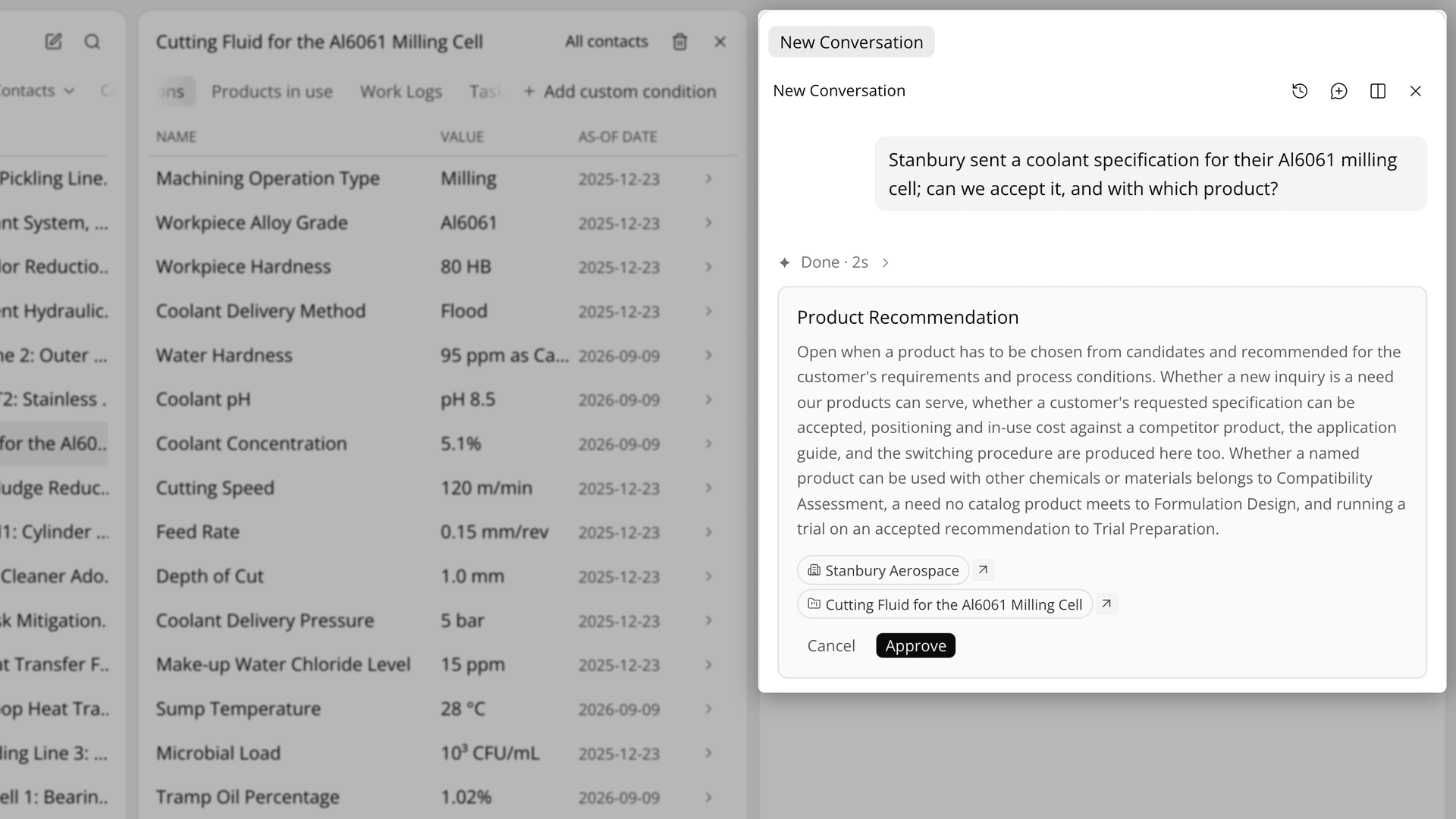
Figure 1. The card shows the skill, account and project before anything runs.
Read step 02, then answer. On the 02 tab, read the first and second recommendations, the score gap and the condition that could reverse the order. Then answer the Questions from the agent card on the 03 tab.
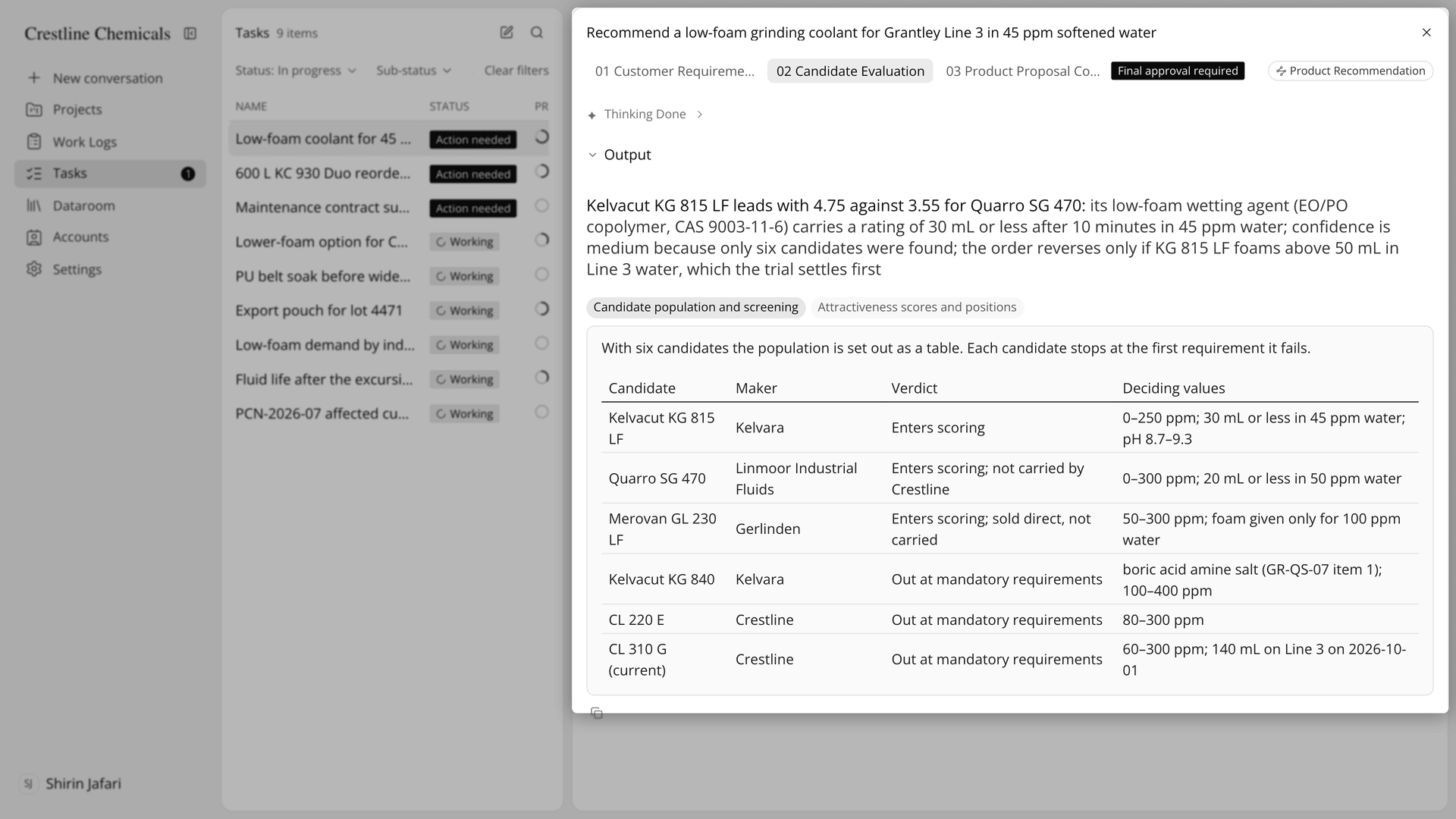
Figure 2. Candidate Evaluation shows the top two scores and where each other candidate dropped out.
Approve the proposal. Make your edits, then press Approve and finish.
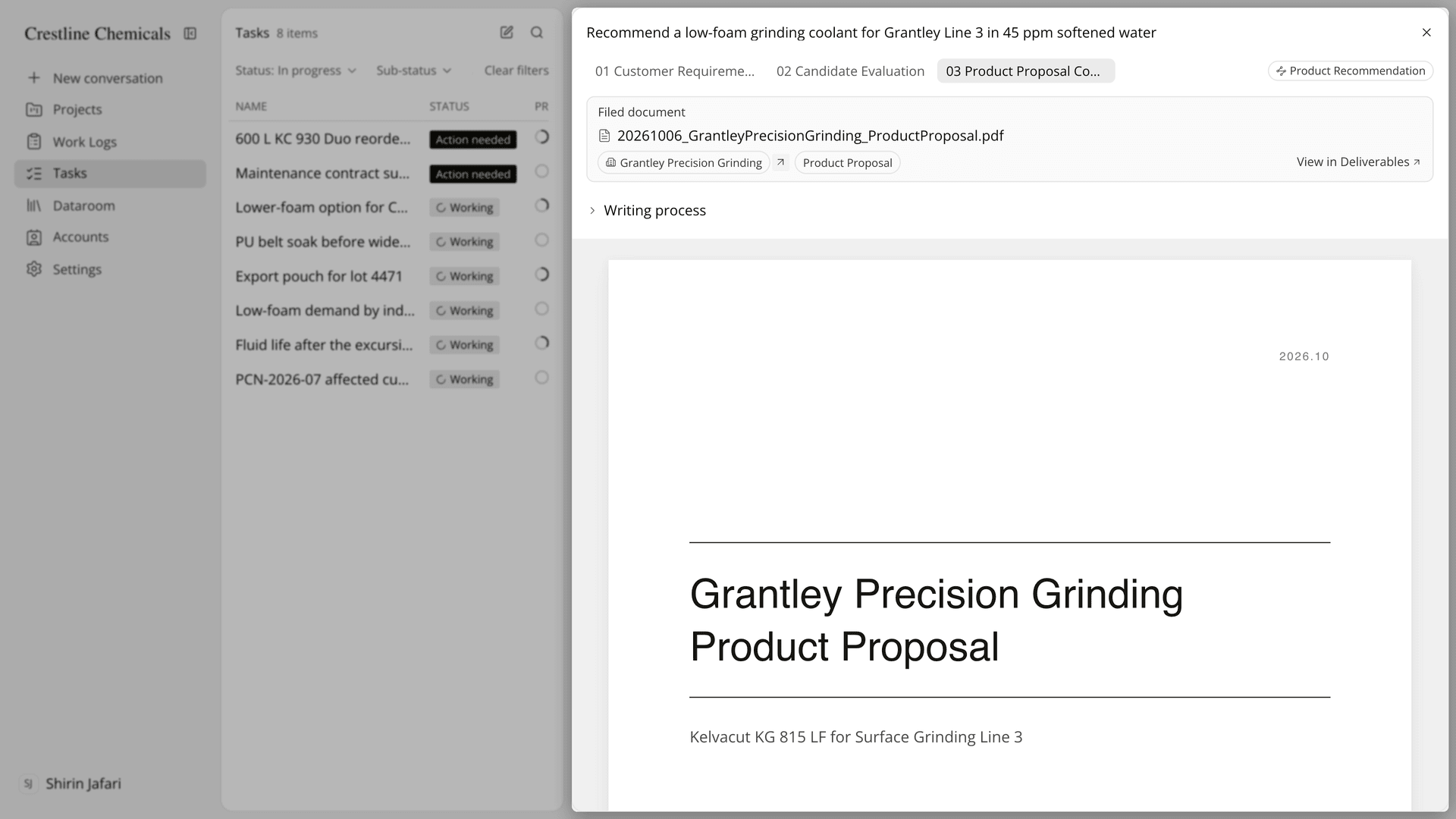
Figure 3. The approved proposal is filed as a PDF in the account's Deliverables.
How does a replacement review in Tasks compare with a spreadsheet comparison?
A replacement review run as a task keeps the meeting, the line conditions, the candidate comparison and the approved proposal on one account, where a spreadsheet comparison keeps only the table. The table below follows a replacement review from the customer's notice to the approved proposal:
Work | Email and a comparison spreadsheet | Product Recommendation task |
|---|---|---|
Gather the line conditions | Old visit notes, memory and old emails | The meeting saved as a work log, its values applied to the project |
Compare data sheets | Values retyped from TDS in different units | Step 02 compares candidates on the same basis |
Products you do not carry | Often left out | Included when candidates are gathered |
Quality against purchasing | Reconciled while writing the email | Requirements recorded with the department that stated them |
Send the proposal | An email attachment | A PDF in Deliverables, shared with Selected contacts |
What comes next | A new thread for each step | Compatibility Assessment, Trial Preparation and Trial Result Evaluation on the same project |
The row that matters most is the comparison. In a spreadsheet, the scores rest on whoever retyped the values. In step 02, the conclusion states the first and second place, the gap between them and the condition that could reverse the order, and selecting a sentence and pressing Ask gets an answer from the records the task actually read.
On the internal benchmark published on the Tasks page, the Product Recommendation task needed 3.0 human interventions per case, against 11.8 for a general agent on the same cases and documents (Lubinpla, 2026). For the same task run on a new requirement rather than a replacement, see handling product recommendation requests with Tasks.
What does a Tasks replacement review not decide?
A Tasks replacement review does not fill gaps in your records or replace the trial. A step does not make up values missing from the records. It states what is unconfirmed, and many unconfirmed values mean the project needs filling in. Add the missing Conditions and Products in use, then use Re-instruct AI from the task's row menu (Cancel a running task first), which permanently deletes the previous steps and messages without going through the trash.
Some inputs are not read at all. AI Chat and tasks do not read the note field of products in use, so the reason for a discontinuation belongs in a work log. Lubinpla cannot read audio files yet, so send the transcript instead.
Approval has fixed rules. Once approved, the proposal cannot be changed, and you cannot approve while edit suggestions are still open. If your organization has turned off final approval for this skill, the proposal is filed without approval, so read it in Deliverables before you share it.
A recommendation is not an adoption. On the same project, the Compatibility Assessment skill rates each combination, such as the new product with residue of the old one, as compatible, conditionally compatible or incompatible, and Trial Preparation writes a trial plan with pass and stop criteria. Values a contact returns through a field data request reach the condition history only after you approve them, by default. If you already use the app, the Tasks guide covers each screen of a task.