Why Every Specialty Chemical Case Ends in One Document
A specialty chemical customer's technical case should end in one approved document written for that case, because no two cases are the same. Conditions, materials, water, equipment and site history decide the answer, so a generic report answers no one's case. In Lubinpla, each task writes that document from your records, and by default a person approves it before filing.
Water alone can split two metalworking sites: the US OSHA metalworking fluids manual notes that hard water forms insoluble soap scum with many fluids and that soft water can cause a lot of foam with some products (US OSHA, accessed 2026).
A McKinsey Global Institute study estimated that interaction workers typically spend 19 percent of working hours trying to track down information needed to complete tasks, the search a scattered case leaves to whoever picks it up (McKinsey Global Institute, 2012).
Each built-in Lubinpla task ends in one named type of document, such as a Product Proposal from Product Recommendation or a Problem Resolution Report from Troubleshooting, and that type stays with the filed PDF.
Lubinpla's Similar Case Analysis fixes its comparison axes before it searches past cases, and it counts an earlier case as applicable only where its governing mechanism and boundary conditions match the current case.
Lubinpla's internal benchmark on product recommendation cases recorded under an hour of hands-on time per case, against about 4.6 hours when a general AI agent worked the same cases from the same documents (Lubinpla Tasks page, 2026).
What happens to a technical case before anyone writes it down?
A technical case usually reaches the team in pieces and stays in pieces, because nobody is asked to write it up as a whole. Picture an application engineer at a distributor. A plant's maintenance planner emails that the coolant on a grinding line has started to foam. The engineer calls the plant and notes the answers in a notebook. The plant's lab sends sump readings as a spreadsheet, a field technician posts a photo in a chat group, and the TDS sits in a thread from the original order.
The customer gets fragments too: a reply suggesting a lower concentration, then an email about a defoamer. Nobody sends one thing that says what was found, what was ruled out, what to do and what is still unknown.
Then the line foams again, and the engineer who handled it has moved to another region. The next engineer opens a shared inbox and asks the plant the same questions about water, concentration and recent changes.
Why is every specialty chemical case independent?
Every specialty chemical case is independent because the facts that decide the answer belong to one customer's site and never repeat exactly anywhere else. Take two plants that send the same request: which coolant should run on a new aluminum machining line?
The first plant mixes its coolant with softened water. The second uses hard well water. The OSHA metalworking fluids manual explains why that matters: hard water's calcium and magnesium "will form insoluble soap scum when mixed with many MWFs", while "a lot of foam may be caused by soft water with some products" (US OSHA, accessed 2026). One product can foam at the first plant and leave soap scum at the second.
Site history and the problem itself split cases further. If the second plant dropped a product after a staining complaint, that reason rules out a candidate the first plant could still run. The stain may not even come from the coolant: white stains on washed die castings that rewashing will not remove can trace back to silicate from an alkaline cleaner drying on poorly rinsed parts, so the first checks there are the rinse stages and rinse water.
Because each case exists only once, the work can only end in one report written for that customer and that case. One document is a consequence of the case being independent, not a formatting choice.
Why does a generic report or a general AI draft answer no one's case?
A generic report answers no one's case because it was written before the case existed, and a general AI draft can repeat that problem faster. A brochure, a standard application guide or a reused template answer says what a product does under typical conditions. It does not name this site's water or alloys, the candidates dropped and why, the conditions the advice depends on, or what is still unknown. A plant manager cannot approve a change on the strength of "suitable for most aluminum machining".
General AI tools do help at first: an assistant turns pasted call notes into a clean reply in a minute. The limits show once the case has history. The assistant works on copies: its reply leaves as an email, and the account never learns what was concluded. It answers from general knowledge, not from your TDS limits or the site's past, so a template it fills reads plausibly anywhere. As more threads get pasted in, a key detail can land mid-input, where Liu and colleagues found that model performance "significantly degrades when models must access relevant information in the middle of long contexts" (Liu et al., TACL 2024).
In Lubinpla, a task's steps read the account, projects, work logs and the files in the Dataroom and Deliverables, and a customer document is filed back in that account's Deliverables.
What does one document per case mean in Lubinpla?
In Lubinpla, one document per case means that the work on a case runs as a task, and a task ends in exactly one document of a named type. Calls and visits are recorded as work logs, and the task's steps read them along with the account, projects and files, so the document comes from the task, not from each email or call.
The document type matches the work. There are 21 built-in tasks, and each ends with a step that writes its document: Product Recommendation ends in a Product Proposal, Troubleshooting in a Problem Resolution Report, Trial Preparation in a Trial Plan. When a case moves on, say from a recommendation to a trial, the next stage runs as its own task and ends in its own document.
The document is written for its reader. A customer document's cover names the account under PREPARED FOR, and before writing, the document step asks what of the work should reach the reader. In most built-in tasks, the document step gathers the results of every completed step and composes them, reaching no new judgment, so the document says what this case's steps found.
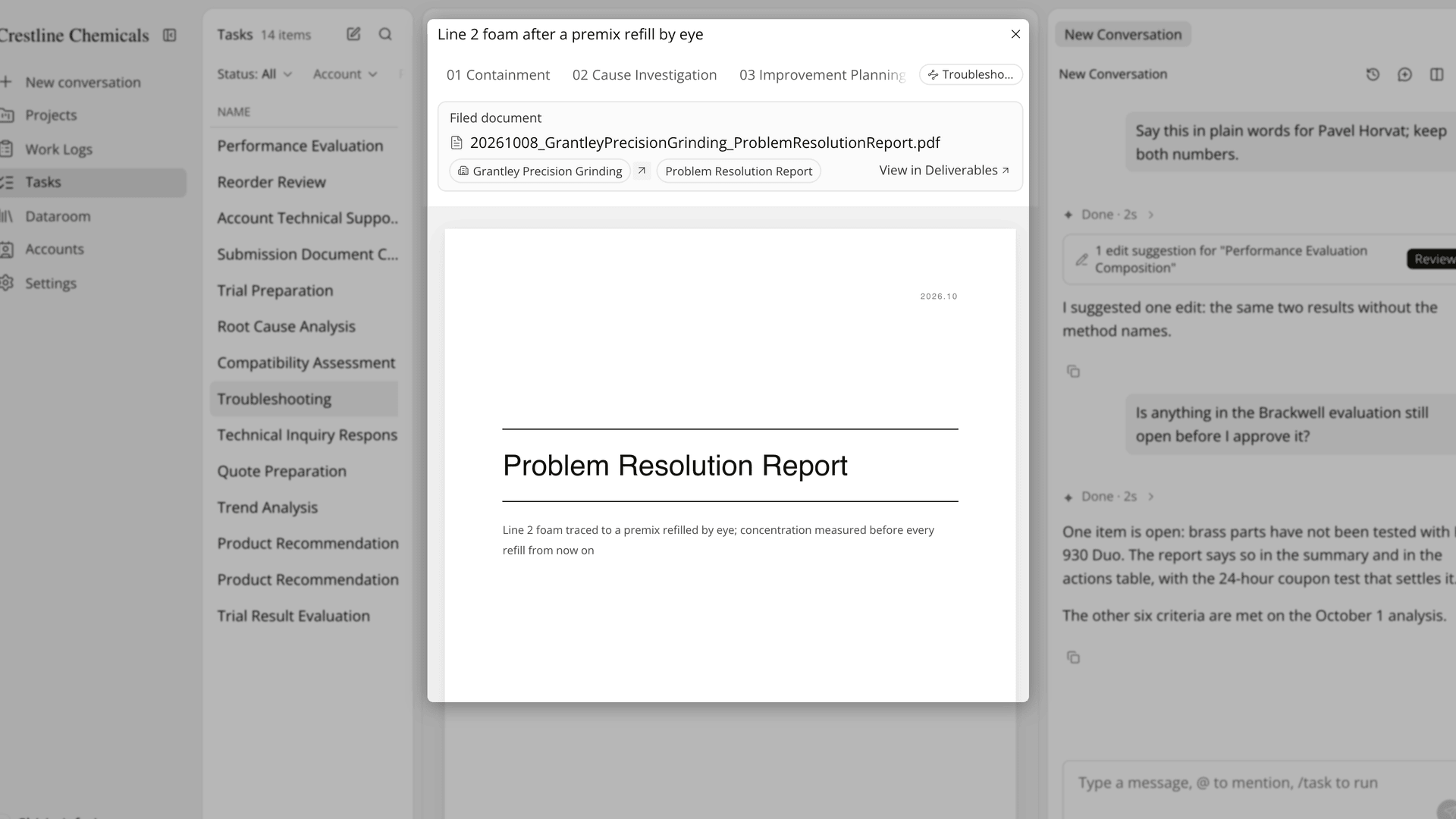
Figure 1. A troubleshooting case closes with one filed Problem Resolution Report for the customer it was run for.
What does one approved document do for the technical team?
One approved document gives the technical team an approval point, an answer the customer can act on, a precedent on file and a clean handoff.
The approval point is accountability. When a person presses Approve and finish, the step shows Approved by with the approver's name and the time, and the document can no longer be changed. The team knows what the customer was told and who stood behind it.
The answer works because the customer can act on it. A plant manager who receives the conclusion, the conditions it rests on and the next step has something to approve, order or run.
The precedent stays with the account. Later tasks read the files in its Deliverables, and when a new case looks like an old one, Similar Case Analysis compares them on axes fixed before it searches and does not promote a past conclusion into a confirmed current decision. The earlier document informs the new case, which still gets its own.
For the handoff, if an engineer is away, Edit assignees passes the task to a teammate, who opens the steps and the filed document instead of a forwarded inbox.
What goes into a technical case document?
A technical case document carries the conditions, the candidates, the evidence, the conclusion and the open items. The conditions are the site's own values, such as concentration, water, materials and temperature. Candidates are laid out widely first, and one drops out only when a confirmed site condition or a reported observation rules out its premise, with the reason kept.
The evidence stays tied to the statements. Tables usually carry a caption with their source and as-of date, and a references page at the end lists sources the task's steps cited, such as Dataroom files and web pages, in rows you can edit before approval. Lubinpla carries confirmed, inferred and unknown separately to the end, so a confirmed statement holds its source and an inference holds its mechanism and how to check it.
The open items belong to the answer. Any unknown that could reverse the conclusion is stated, and when the evidence leaves more than one candidate standing, the document gives each with the test that would separate them. The reasoning that gets from site conditions to that conclusion is the subject of our post on what technical reasoning means in specialty chemicals.
How does a case document compare with an email thread, a CRM note and a template?
A case document holds the whole case for one customer, where an email thread or CRM note holds parts of it and a generic template holds none of it. The table below sets each need against the three:
Need | Email thread or CRM note | Generic report template | Lubinpla case document |
|---|---|---|---|
Written for this site's conditions | In pieces across replies and activity notes | No, written before the case | Drawn from the account, project and work logs |
Candidates ruled out, with reasons | Only if someone wrote them down | Not covered | Kept in the steps, and in the document as far as you choose |
Confirmed, inferred and unknown | Mixed in the prose | Not separated | Carried separately to the end |
Approval | No record of who checked it | A signature line, if anyone signs | Approved by, with name and time |
Where it lives | One inbox or one CRM entry | A copy on a shared drive | Filed PDF in the account's Deliverables |
Use in the next case | Search the inbox | Start from the blank form again | Read by later tasks and by Similar Case Analysis |
The row that decides the most is the last one. An email thread has to be found and reread before it helps the next case, and by then the engineer who knew which reply was final may be gone. A template starts every case from the same blank form, so nothing learned at one site reaches the next. A filed case document sits in the account's Deliverables, where the next task at that site reads it and Similar Case Analysis can compare a new case against it axis by axis. The approval row matters when something goes wrong: with an email thread nobody can say who checked the answer, while a case document shows who approved it and when.
What does a case document not do?
A case document is only as current as the records behind it, and it does not replace the checks that decide whether a product works. A data sheet revision that never reached the Dataroom, or a call nobody logged, stays invisible to the task.
A Product Proposal is not a qualification. Whether the product works is settled at the bench and on the customer's line, and Trial Preparation sets the pass and stop criteria for that trial in advance.
The customer PDF does not carry the in-app citations. In the app, the steps' statements carry numbered citations to the records and web pages behind them. The customer's PDF drops those marks and prints the references page you checked before approval instead.
Nothing goes to the customer until someone on your team shares it. A filed document starts as Private, and the account's contacts see it in Field Care only after you share it.
For the wider picture, read what Lubinpla is. The Tasks page lists each task with the document it ends in, and our post on technical reasoning in specialty chemicals covers the reasoning inside it.