Keep Every Customer's History in One Place With Accounts
A technical team can keep each customer's contacts, standing rules, lines with their own notes, work logs and filed documents together in one Lubinpla account. Anyone on the team opens the same account before a visit or a reply. AI Chat and task steps can read those records too, and a briefing marks where each point came from.
A customer's standing rules, such as who approves a price or which documents must come with every new product, leave with the rep at a handover unless someone wrote them down where the next rep will look.
In January 2026, US manufacturing workers had a median of 4.9 years with their current employer, so a customer relationship that lasts a decade will likely pass through more than one rep (US Bureau of Labor Statistics, 2026).
In January 2026, 20.6 percent of US wage and salary workers had been with their current employer for a year or less (US Bureau of Labor Statistics, 2026).
Lubinpla keeps each customer's contacts, standing rules, production lines, work logs and filed documents in one shared account, which the AI reads when it answers a question or drafts a document for that customer.
Before a visit, a rep with the customer's account open can ask the AI for a briefing, and each point in the answer is marked with the record it came from so the rep can check it.
What happens today when a technical rep takes over a customer account?
A technical rep who takes over a customer account today usually inherits a mail folder and a contact sheet, not the history. Picture a lubricant supplier's rep who picks up a forging plant after a colleague moves to another region. In the first week, the plant's maintenance lead calls about the die lubricant trial that started in the spring.
The trial plan is in the previous rep's sent mail. The readings from the last two visits sit in a spreadsheet on a laptop that has been handed back. The contact sheet lists four names, but not that the maintenance lead runs trials while purchasing at head office approves anything with a price on it.
The rep sends a quotation to the plant engineer, who forwards it to purchasing with a question about why the format changed. Then the quality manager asks for the CoA (certificate of analysis) and a local-language SDS (safety data sheet) that the plant expects with every new product. Nobody wrote that rule down, because the previous rep simply knew it.
None of this is a failure of effort. The customer's standing rules, the history of each line and the documents already sent lived in three different places, and the person who held them together has left the account.
Why does customer history kept in inboxes and spreadsheets break down?
Customer history kept in inboxes and spreadsheets breaks down because each tool holds one kind of record and none holds the reasoning that ties them together. The inbox holds what was said, in one person's mailbox. The spreadsheet holds names, dates and readings, without the reason a product was dropped. The shared folder holds documents, without a record of which version went to which customer.
The gaps widen when people change jobs. In January 2026, US workers in manufacturing had a median of 4.9 years with their current employer (US Bureau of Labor Statistics, 2026). Across all US wage and salary workers, the share with a year or less with their current employer was 20.6 percent in January 2026 (US Bureau of Labor Statistics, 2026). These are national figures, not figures for chemical technical teams, but they suggest that a customer relationship lasting ten years will likely pass through more than one rep.
A second strain is that standing facts and daily events get mixed. A rule such as "quotations go to head office" ends up buried in an old visit report, and the next rep has to read every report to find it. When the history is spread out this way, each handover sends the customer back through questions they have already answered.
Where does a general AI assistant fall short on customer account history?
A general AI assistant, or an in-house agent fed from a spreadsheet export, falls short on customer account history because it sees only what reaches it, though it is useful at first. Before a call, a rep can paste a long mail thread into a chat and get a clean summary of what the customer asked for.
The first limit is that its context stops at one place. The assistant sees the thread you pasted, not the work logs from earlier visits, the documents already sent or the conclusion of an earlier trial. A summary of one thread reads as complete when it is not.
The second limit is that it answers from general knowledge. Asked how to prepare a quotation for a forging plant, it describes what plants generally want, not that this plant routes every price through purchasing at head office.
The third limit is upkeep. An in-house agent built on a weekly export needs someone to refresh the export and adjust the prompt. When that person moves on, the export stops and the agent keeps answering from the last copy.
In Lubinpla, the account itself holds the note, contacts, projects, work logs and filed documents. While an account is open, AI Chat attaches it to your question and marks where each point came from.
How do you set up and use a customer account in Lubinpla?
You set up a customer account in Lubinpla by creating it, writing its note, and then working from its tabs and from AI Chat.
Open Accounts and press Create Account, the + button above the list. Enter the company's Name, using the trade name the company actually uses. Press Add Contact to add people now, or later from the Contacts tab, then press Create.
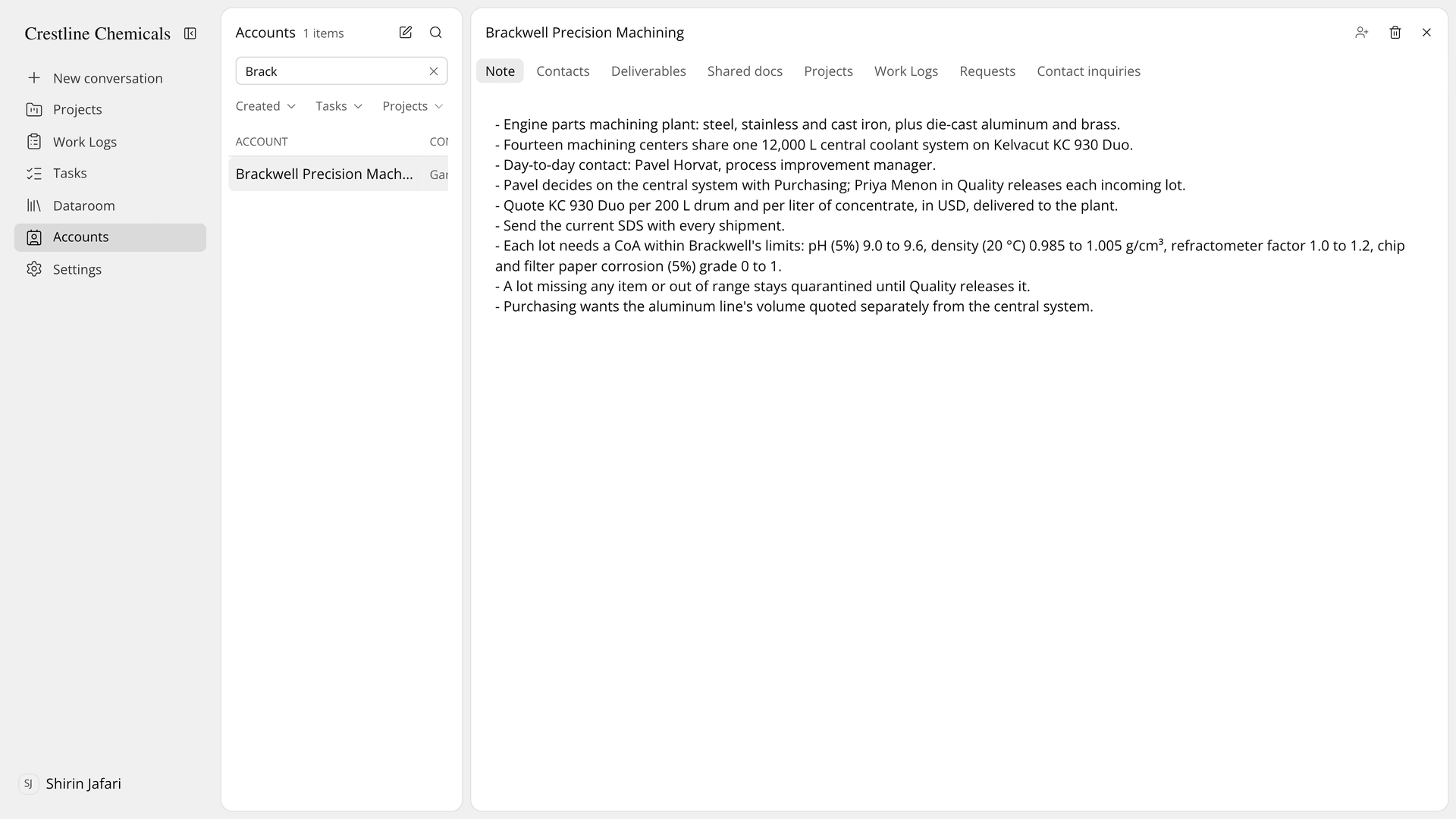
Figure 1. One account holds the note, contacts, deliverables, shared documents, projects, work logs and requests.
Write the account note. On the Note tab, write the facts that are true of this customer only, one per line: who signs off on what, how they want a quotation, which documents they ask for with every new product. What happened on a given day belongs in a work log, and facts about one line belong in that project's note.
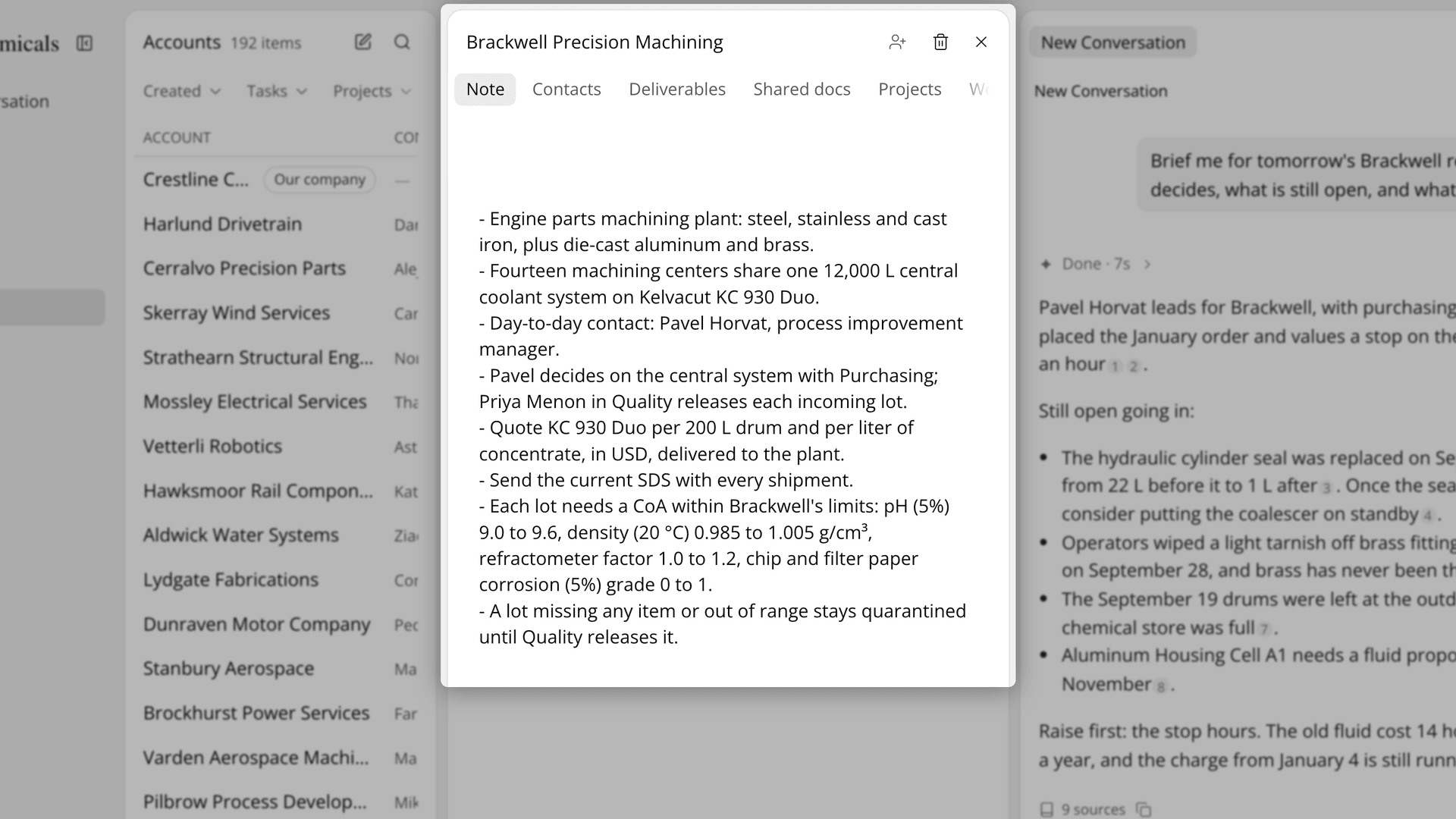
Figure 2. The note holds standing rules that anyone on the team can read.
Follow the work from the account's tabs. Projects lists the customer's lines, Work Logs lists the logs tagged to the account, and Create Project opens a new project with this account already filled in.
Before a visit, open the account and ask AI Chat in your own words, such as who decides and what is still open.
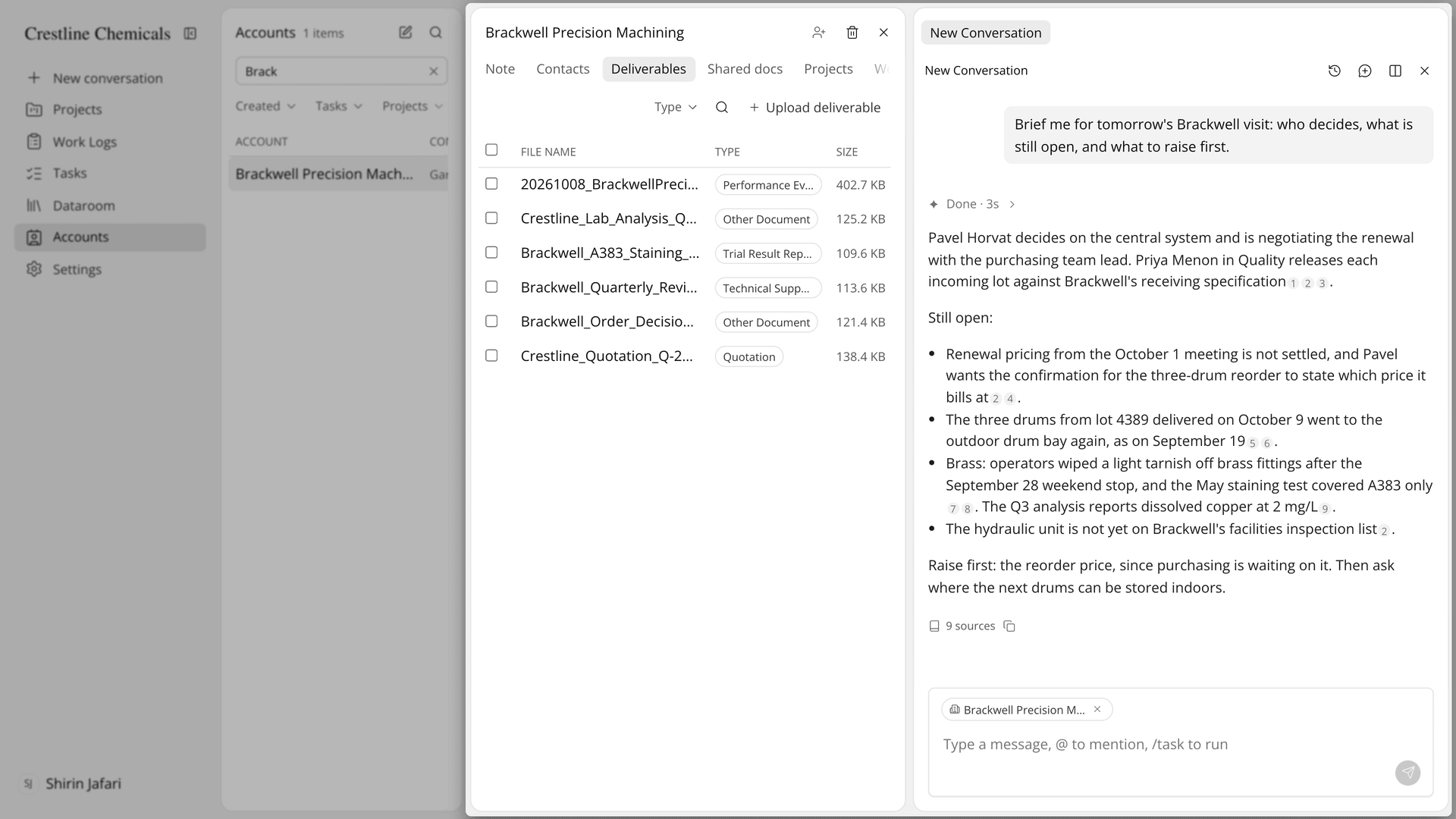
Figure 3. A briefing drawn from the team's own records, with a source for each point.
The Academy video moves through one sample account, from its contacts to its deliverables, projects and work logs.
How do Accounts compare with inboxes and spreadsheets for customer history?
Accounts keep a customer's people, rules, lines, logs and documents in one record, where inboxes and spreadsheets keep them in several places that each belong to someone. The table below follows one customer's history from the first contact to a handover:
Work | Inbox, shared folder and spreadsheet | Lubinpla Accounts |
|---|---|---|
Know who to call | A contact sheet or one rep's phone | Contacts tab with name, title, phone and email |
Follow the customer's standing rules | Known by the rep who learned them | Note tab, one fact per line, readable by AI Chat and task steps |
See what happened on each line | Visit reports in personal folders | Projects and Work Logs tabs on the account |
Find what was sent | Search the sent mail | Deliverables tab, including documents filed from the customer's approved tasks |
See which data sheets the customer has | Ask whoever sent them | Shared docs tab lists the Dataroom files shared with the customer |
Prepare for a visit | Read every thread the night before | Ask AI Chat with the account open, with sources marked |
The row that matters most at a handover is the standing rules. In the inbox workflow, a rule like "price goes to head office" leaves with the rep who learned it. In an account, the rule is a line in the Note tab, and AI Chat and task steps can read the note when they look up this customer, so a document drafted for them can follow it.
The Deliverables row matters when a task finishes. A product recommendation run as a task, as described in handling product recommendation requests with Tasks, files its approved document under the customer's account. The Accounts page shows the rest of what an account holds.
What does the Accounts feature not do for customer history?
The Accounts feature holds only what your team writes and files in Lubinpla, and it does not decide what is true about a customer. A visit nobody logged, or a rule nobody wrote in the note, is not in the account, and a briefing cannot draw on it. The AI marks where each point of a briefing came from so that you can check it, and the check is still yours.
The note is for standing facts. A note can be up to 10,000 characters. Events belong in work logs and line facts in project notes, or the note turns into the buried visit report it was meant to replace.
Sharing with the customer is a deliberate step. New documents in Deliverables start as Private, documents under Our company cannot be shared with contacts, and moving a shared document to another account turns its sharing off.
Some actions cannot be undone in the usual way. Deleting a contact is permanent. A deleted account goes to Trash with its deliverables and is permanently deleted after 30 days, and restoring the account does not bring the deliverables back. If you already use Lubinpla, the Accounts guide in the app covers contacts, invitations and the Our company row in full.