Track a Customer Line From Inquiry to Decision With Projects
A technical team can track a customer line as a Lubinpla project that keeps each condition as dated readings beside the products in use. Anyone on the team adds a reading in one AI Chat message or on the Conditions tab, earlier values stay in the history, and AI Chat answers what changed from that record.
A trial decision on a customer line rests on separating the readings taken before a product changeover from those taken after it, which is slow when the switch date sits in an email and the readings sit in separate tabs.
UK HSE guidance tells users of metalworking fluids, including the wash fluids in parts washing machines, to check bacterial contamination with dip slides and act on the readings in line with their risk assessment (UK HSE, 2024).
A Lubinpla project keeps each condition on a customer line as a history of dated readings next to the products in use, so a changeover stays on record beside the values before and after it.
Asked what changed on a line, Lubinpla answers from the project's condition history, products in use, standing notes and linked work logs, and can draw the trend as a chart.
What happens today when a customer line is tracked in a spreadsheet?
A customer line tracked in a spreadsheet usually starts as one tidy tab and ends as a file only its author can read. Picture the technical service engineer at a supplier of aqueous cleaners. A plant's quality lead calls: parts leaving the washer on the gearbox line show water spots and a light oily film, and purchasing wants to know whether the cleaner should change.
The engineer visits, titrates the bath, notes the temperature, sets a dip slide and writes it all in a notebook. Back at the desk the values go into a spreadsheet, one tab per visit. The plant's maintenance crew keeps its own clipboard of top-ups and bath dumps. Six weeks in, a trial of a second cleaner starts, and the only record of the start date is an email to the plant.
By the time the plant manager asks for a decision, keep the trial product or go back, the file has grown a tab for every visit. Some tabs give concentration as a percentage, others as titration points. A bath dump that would explain one unusually good week is on the clipboard, not in the file. The reason the first trial drum was run lean sits with a colleague who has since moved to another region. The decision meeting starts with the engineer rebuilding the history instead of discussing it.
Why does tracking customer line conditions in spreadsheets break down?
Tracking customer line conditions in spreadsheets breaks down because a reading only means something together with its date, its unit, what happened on the line around it and which product was in the system, and a spreadsheet keeps those in different places or not at all. A cell holds a number. The date next to it may be the day someone typed it in. The unit depends on who measured. When the current value is overwritten, the earlier one is gone, and with it the point where the trend turned.
Product changes make it worse. A changeover recorded in a delivery note or an email cannot be laid next to the readings, so nobody can say which values came before the switch and which came after. That split is exactly what a trial decision rests on.
Safety guidance also expects readings to be used, not just collected. The UK Health and Safety Executive tells users of metalworking fluids to "check levels of bacterial contamination using dip slides, or other means of measuring the level of bacterial activity, in both metalworking and associated fluids eg in washing machines, and act on the readings obtained in line with your risk assessment" (UK HSE, 2024). Acting on a reading in practice means comparing it with the ones before it, which is slow when the earlier values sit in separate tabs, on a clipboard and in an inbox.
Can a general AI tool connected to a spreadsheet track customer projects?
A general AI tool connected to a project spreadsheet helps at first, and that deserves credit. It is available the same day, it summarizes a tab faster than a person, and it turns pasted readings into a tidy visit summary. For one line and a handful of visits, that is enough.
The limits show as the line's history grows. The agent works on an exported or pasted copy, so its summary does not flow back into the spreadsheet or the CRM, and the two versions drift apart. Finding the right reading also gets harder as the file grows: in tests on multi-document question answering, language models often did best when the relevant information sat at the beginning or end of a long input and significantly worse when it sat in the middle (Liu et al., TACL, 2024). The answers draw on general knowledge of cleaners, not the criteria this customer agreed or the way your team judges a trial. And the agent sees the spreadsheet alone, not the account history, the visit notes, the data sheets or the conclusion of the last review. Keeping the prompts, the connection and the file versions working is someone's job, and the setup depends on that person staying.
A Lubinpla project holds the readings themselves, and while the project is open, AI Chat reads its condition history, products in use, note and linked work logs when you ask about the line.
How do you track a customer line as a project in Lubinpla?
You track a customer line by creating one project for it, choosing the conditions to follow, and adding every reading and product change to it.
Create the project. In Projects, press Create Project, enter the Project name, pick the Category one level at a time, select the Account and press Create. Make one project per line, not one per problem.
Choose the conditions. On the Conditions tab, open Suggested conditions, select one you measure, enter the first value with its unit and As-of date, and press Add. For anything the list lacks, use Add custom condition.
Record each reading. Write the check in AI Chat the way you would say it. AI Chat finds the project, matches each value to its condition and adds it to the history, and it asks first when the project or condition is unclear. Check its reply to see where each value went. On screen, select the condition and press Add value. Set the As-of date to the day the reading was taken.
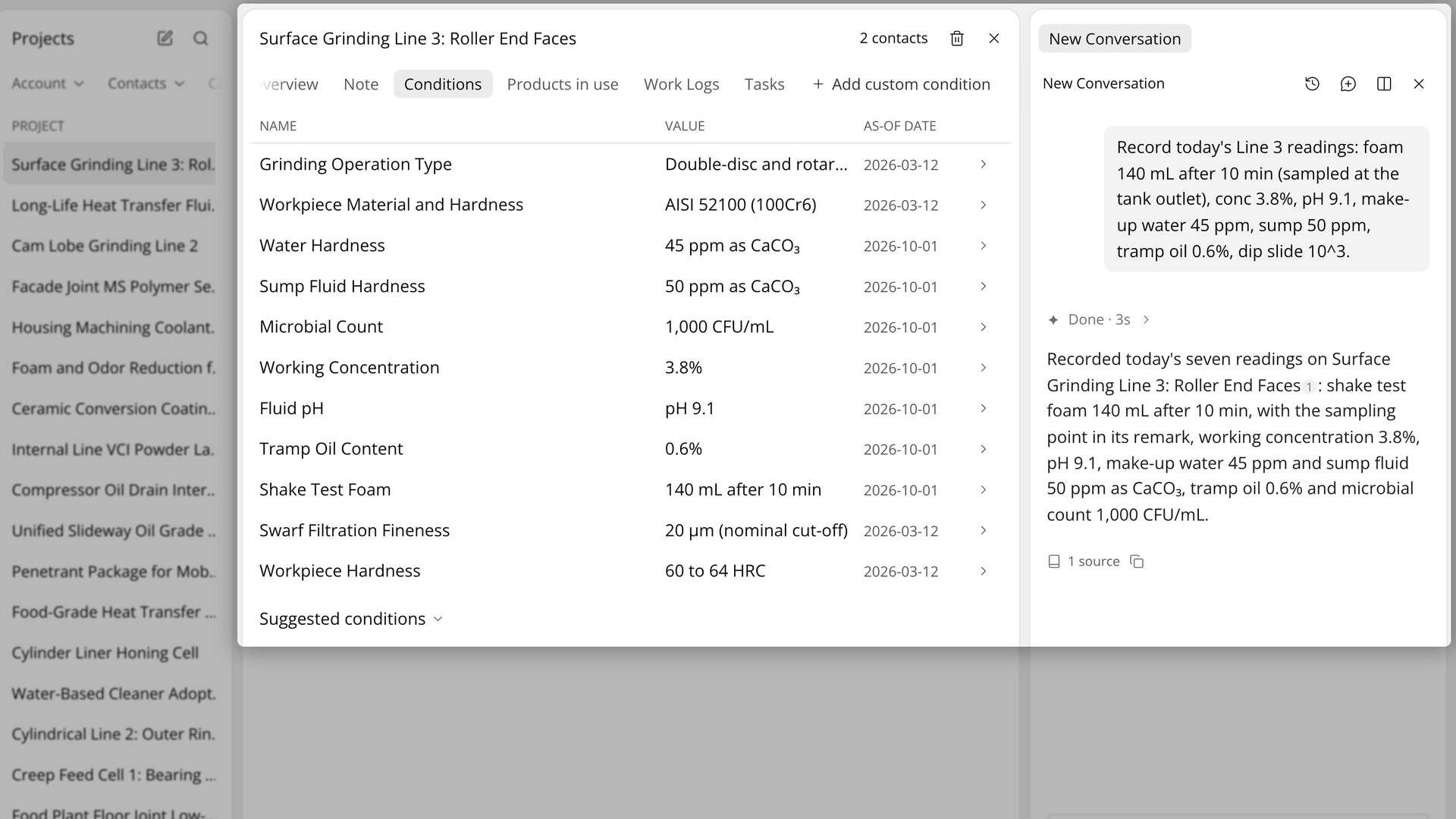
Figure 1. One message records the readings, and the reply says which condition each value went to.
Record the products in use. Open Products in use and press Add product. Enter the Name and, if you know them, the Qty and the As-of date it went in, write in Remark why it went in and what it replaced, and press Add. On a changeover, add a new row and leave the old one.
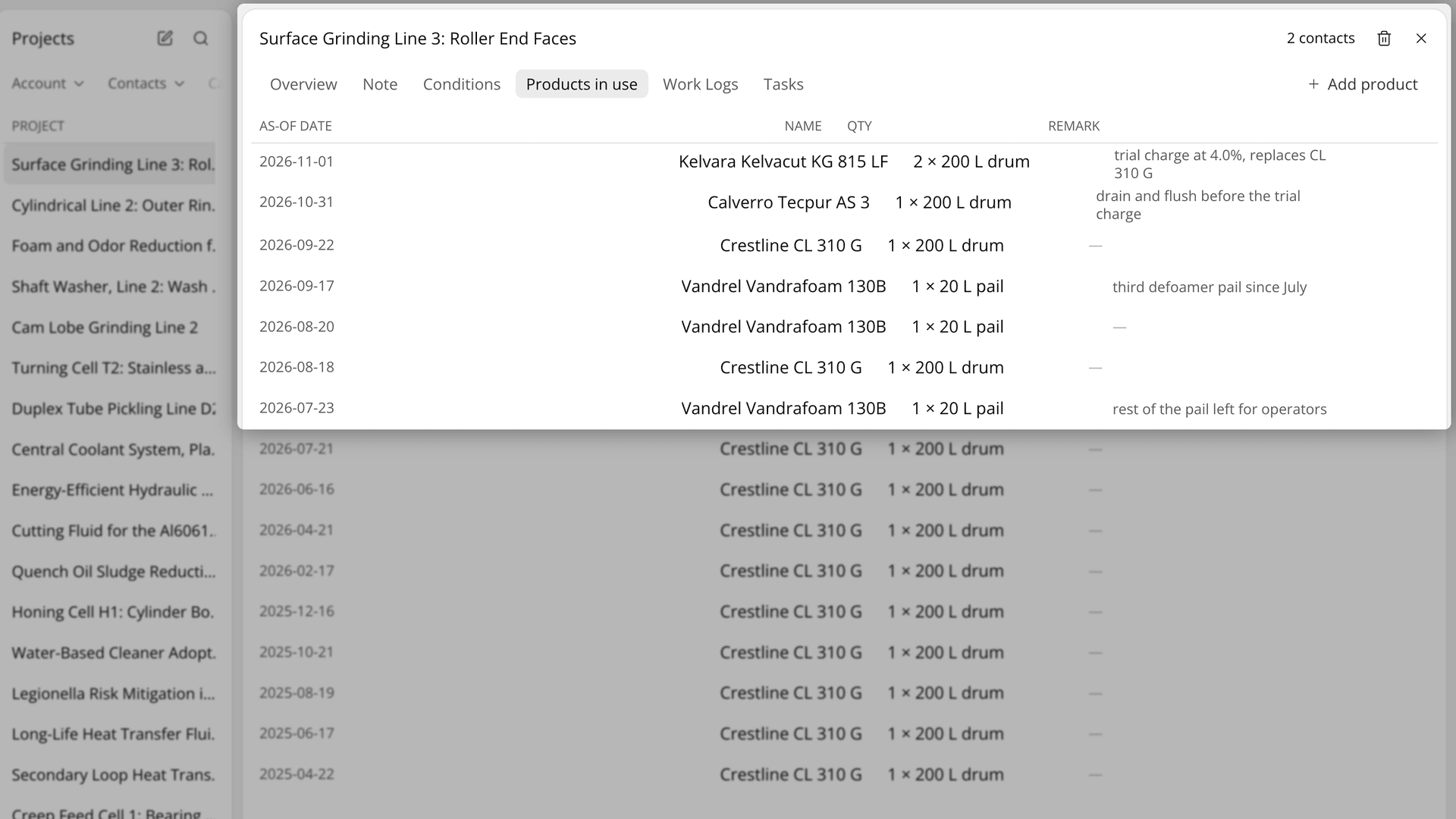
Figure 2. The products in use for a line, the newest row noting which product it replaced and the old row still listed.
Ask what changed. With the project open, ask AI Chat what changed since the product was replaced, and why. It can draw the trend as a chart.
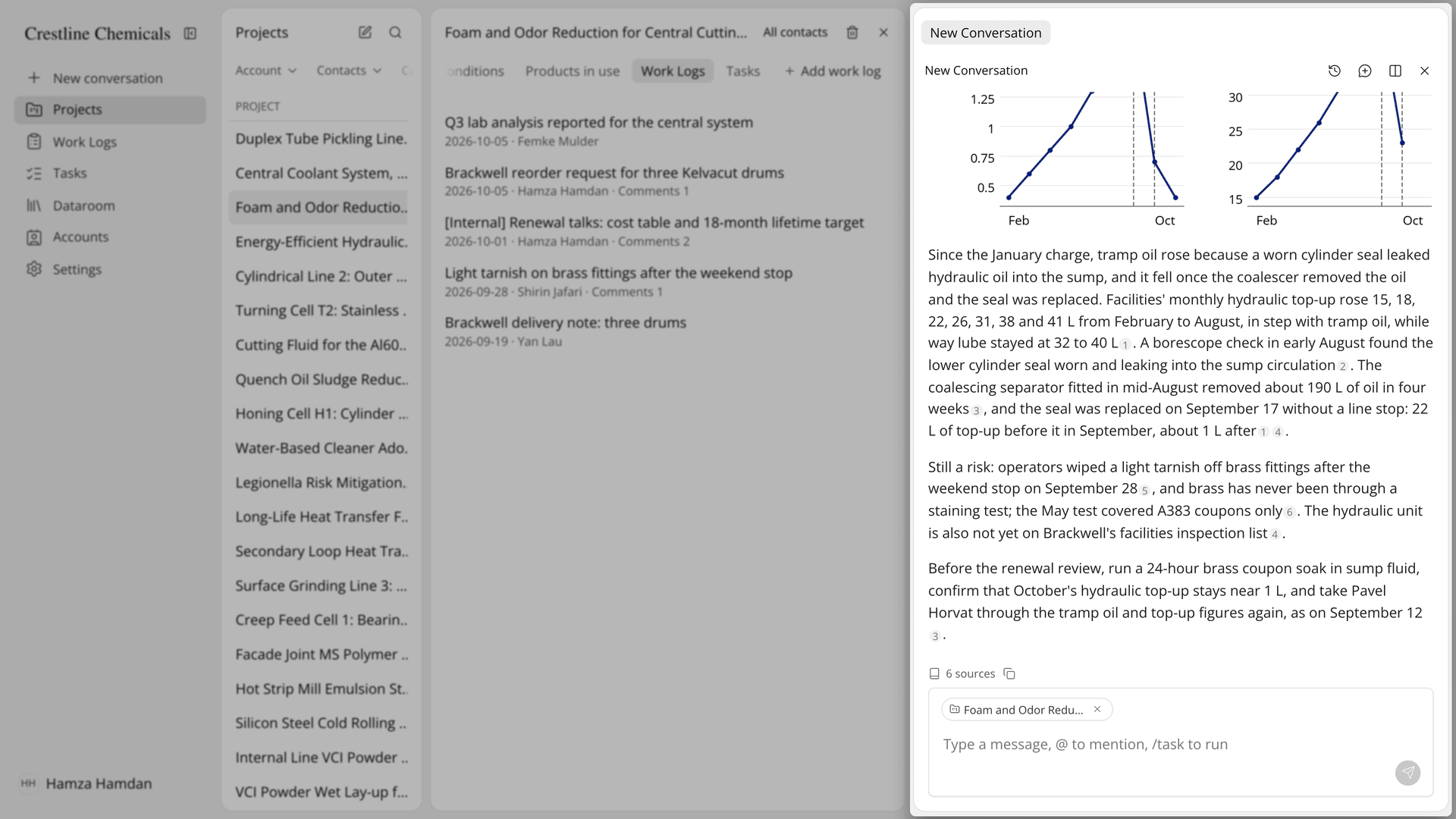
Figure 3. A question about what changed on the line, answered with a trend chart drawn from its recorded history.
The Academy video follows one line from a single message after a visit to its condition history, a product changeover and the question of what changed.
How does a Lubinpla project compare with a spreadsheet for a customer line?
A Lubinpla project keeps the readings, the product changes and the standing facts of a customer line in one record, where a spreadsheet spreads them across tabs, clipboards and email. The table below follows a customer line from the first reading to a product decision:
Work | Spreadsheet, clipboard and email | Lubinpla Projects |
|---|---|---|
Start tracking a line | A new tab, columns chosen by whoever opens it | Create Project, with conditions suggested by the category |
Record a reading | Typed into this visit's tab, unit as remembered | One chat message or Add value, with unit and As-of date |
Keep earlier values | Overwritten, or scattered across tabs | Kept in the condition history with who entered them |
Record a product change | A delivery note or an email | A new Products in use row, with what it replaced |
Keep standing facts | In the engineer's head | The Note tab, written as true now |
Answer what changed | Rebuilt from tabs and mail | Asked in AI Chat with the project attached |
Find the line again | Search file names | Search projects, Filters and Sort |
The row that decides a trial is the product change. In a spreadsheet, the switch date lives in an email, so the readings before and after it are hard to separate. In a project, the changeover is its own dated row next to the condition history, and the old product stays on the list.
Standing facts matter when the line changes hands. The Note tab holds what no condition captures, such as how the equipment is laid out or the criteria agreed with the customer, so a new engineer starts from the same facts as the last one. The note holds up to 10,000 characters and saves as you type.
What does a Lubinpla project not do for a customer line?
A Lubinpla project does not know anything your team has not recorded, and AI Chat does not read everything in it. AI Chat reads each product's name, quantity and as-of date, but not its remark. If the reason for a changeover should inform later answers, also write it in a work log linked to the project.
Corrections are not history. Correcting a cell overwrites the value with no record of the earlier one, so use it only for typos and record a real change on the line as a new reading. Deleting a history entry or a product skips Trash and is permanent. Anyone in your organization can edit or delete a project.
The category sets which conditions are suggested. Change it only to fix a mistake. If the line has become a different application, create a new project so the old history keeps its meaning.
An answer from AI Chat ties a change to a likely cause. It is a starting point for the conversation with the customer, not a lab result, and the trial decision stays with the people who run it. A product recommendation for the line can start from the project's conditions as a task. The Projects page shows what a project holds, and if you already use Lubinpla, the Projects guide in the app covers custom conditions, sharing and the project list in full.