Turn a Senior Engineer's Way of Working Into a Team Skill
A technical team can turn a senior engineer's way of working through a case into a Lubinpla skill that runs the same steps for everyone. Rules go into the skill in plain words, and its steps can read accounts, work logs and Dataroom files. By default, a person approves before the work starts and on the final document.
Deloitte and The Manufacturing Institute put the net need for new US manufacturing employees between 2024 and 2033 at about 3.8 million, with about 1.9 million of those jobs at risk of going unfilled (Deloitte and The Manufacturing Institute, 2024).
A checklist in a shared folder is read when a new rep is trained, not when a case is worked, so a senior engineer's order of checks tends to reach the team as corrections after a reply goes out.
A Lubinpla skill runs a team's procedure as steps in a set order, the same way for everyone in the organization, and a rule written into it in plain words applies every time the skill runs, whoever asks.
Lubinpla's 21 built-in skills each end by writing a document, and out of the box a person approves twice: before the work starts and again when the document is ready.
On Lubinpla's internal benchmark, a troubleshooting case run with the team's skills and records took about an hour of hands-on time, against about 5.8 hours with a general AI agent on the same cases and documents.
How does a senior engineer's way of working a case get passed on today?
A senior engineer's way of working a case usually gets passed on by shadowing, a checklist in a shared folder and corrections after the fact. Take a hydraulic fluid supplier's technical service team. When a customer reports foaming and sluggish actuators, the senior application engineer works in a fixed order. She asks for the last oil analysis and its ISO 4406 particle cleanliness code, checks whether the system was topped up with another fluid, and only then looks at the product. She never suggests a flush without attaching the current SDS (safety data sheet) and TDS (technical data sheet).
None of that order is visible to a new rep. A Word file called "Troubleshooting checklist" sits in the shared folder, last edited before two product changes. The rep answers the next foaming call from the TDS, recommends a flush, and leaves out the SDS.
The senior engineer catches it when she reviews the reply, writes the correction in an email, and explains the same order again. Six months later a second new rep makes the same mistake. The procedure exists, but only she runs it every time.
Why does a procedure that lives in one engineer's head stop scaling?
A procedure that lives in one engineer's head stops scaling because it is applied only when that engineer is in the loop. Everyone else applies the parts they remember. A written checklist helps, but it is read when someone is trained, not at the moment a case is being worked, and it drifts out of date as products and rules change.
The hardest part to write down is where a procedure ends. Knowing that a foaming complaint is a troubleshooting case, while a request to switch the customer to a different fluid is a product recommendation, is judgment that new staff pick up slowly.
New staff keep arriving. Deloitte and The Manufacturing Institute put the net need for new US manufacturing employees at about 3.8 million between 2024 and 2033, and estimate that about 1.9 million of those jobs could remain unfilled (Deloitte and The Manufacturing Institute, 2024). The figures cover US manufacturing as a whole, not chemical technical teams, but the effect on a team is the same: each arrival or departure resets how a case gets worked, and the senior engineer spends her time re-teaching instead of working the hard cases.
Why do general AI tools and saved prompts fall short for a team procedure?
General AI tools and saved prompts fall short for a team procedure because they hold the procedure for one person, not for the team. They do help at first. An engineer who pastes her checklist into a general AI tool gets a first draft in minutes, and a saved prompt saves her from typing it again.
The limits show up once a second person needs the same procedure.
The answer follows general knowledge. Without the team's own order of checks, the tool answers a foaming complaint the textbook way and has no reason to ask for the oil analysis first or to attach the current SDS.
The prompt has an owner. It lives in one person's notes or account. Colleagues keep their own copies, the copies drift, and when the person who built it moves on, nobody maintains it.
The records arrive as pasted copies. The tool sees what someone exported that day, not the account history or the last work log, and the reply it writes does not go back to the customer's record.
In Lubinpla, the procedure is a skill under Settings > Skills that runs the same way for everyone in the organization. A saved rule applies every time the skill runs, whoever asks, and its steps can look up the accounts, projects, work logs, Dataroom files and deliverables your team keeps.
How do you write your team's procedure into a Lubinpla skill?
You write your team's procedure into a Lubinpla skill by adjusting the closest built-in skill, or by building a new one when none fits.
Open Settings and choose Skills, then open the built-in skill nearest your procedure, such as Troubleshooting. Its flow starts at Starts when requested in chat, runs through numbered step cards and ends at Done.
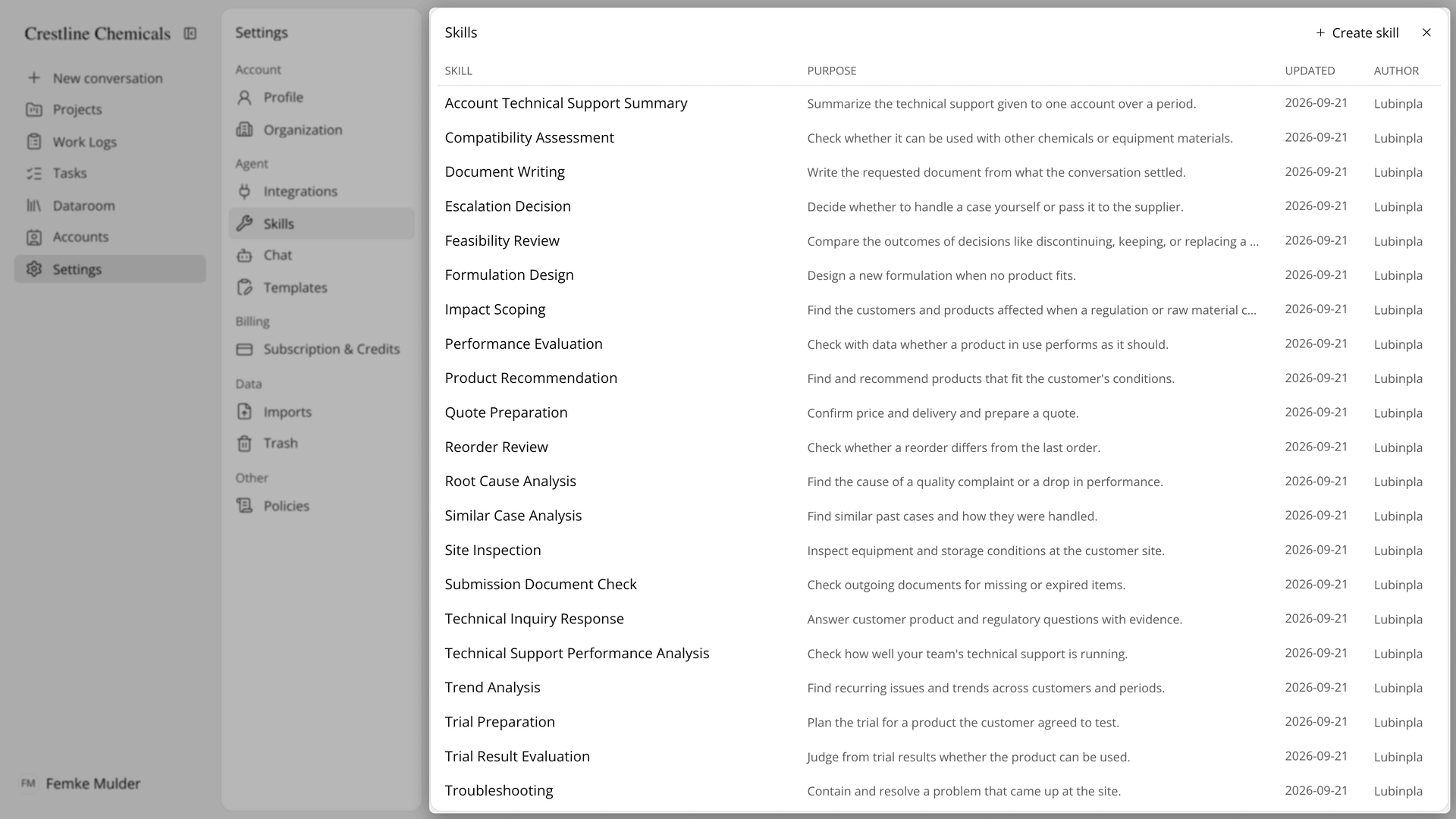
Figure 1. Built-in skills cover the work of the whole team, each with a stated purpose.
Add your rules. Press Skill settings and write the rule in Your organization's rules as you would tell a new colleague, such as "Every proposal lists the current SDS and TDS of each recommended product." For a rule about one step, press that step card and write it there. Press Save all changes.
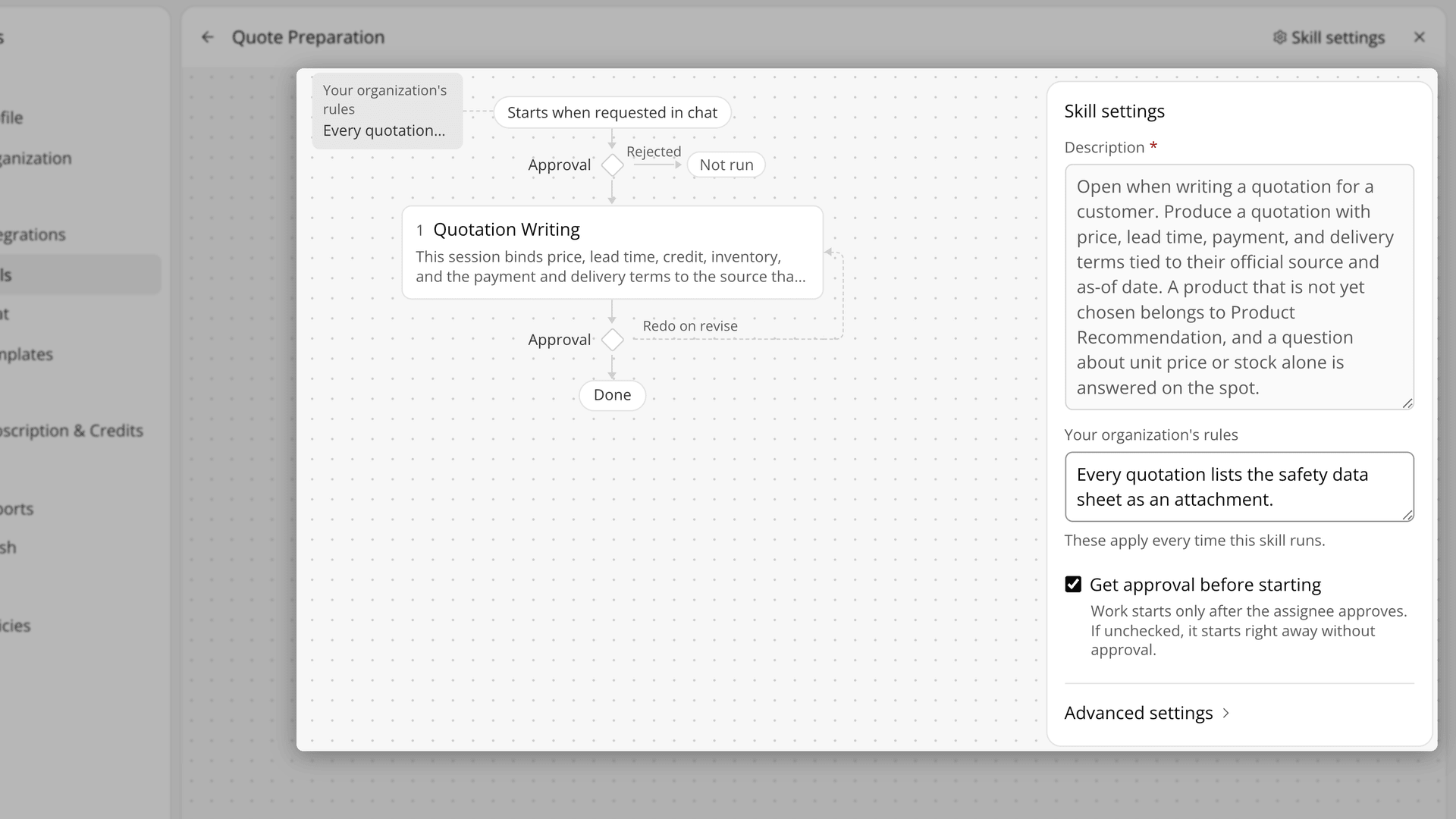
Figure 2. A rule is written once in plain words and shown on the flow next to the step it shapes.
Choose where a person checks the work. Tick or clear Get approval before starting in Skill settings, and Get approval before moving to the next step on a step card, such as Candidate Evaluation in Product Recommendation. Press Save all changes.
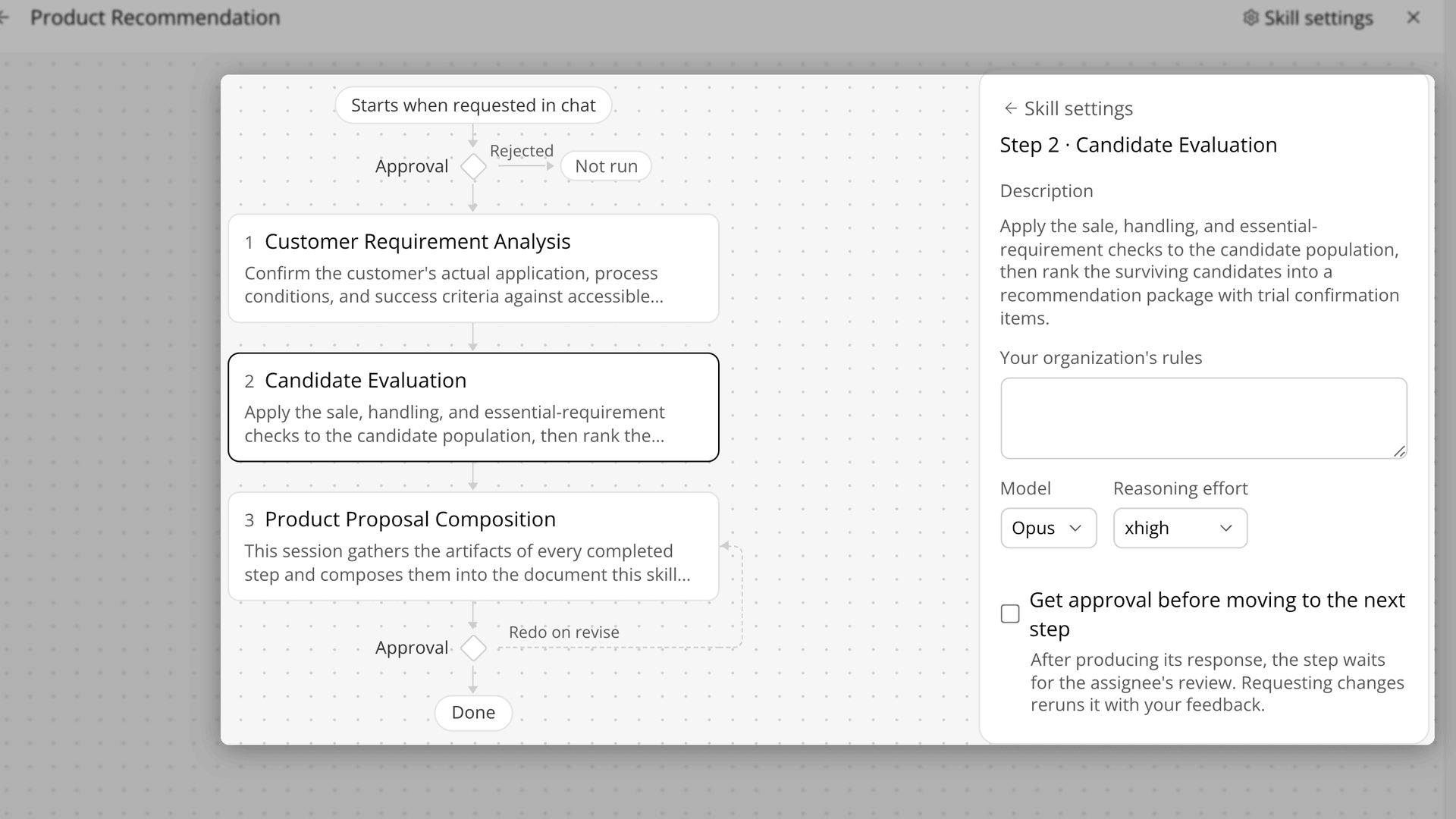
Figure 3. The flow marks each point where the skill waits for a person.
Build a skill when none fits. Press Create skill, enter a Name and a Description, then press Add step to reuse a step or write a New step. For a New step, write Work instructions as a checklist that ends with what to say when evidence is missing. Press Save.
The Academy video shows a team rule applied to a quotation, a chat request that proposes the Submission Document Check skill, the list of built-in skills, a rule added to Quote Preparation, and the Create skill screen.
How does a Lubinpla skill compare with a checklist and a saved prompt?
A Lubinpla skill keeps the order of steps, the team's rules and the approval points in one procedure that runs for everyone, where a checklist and a saved prompt depend on someone reading or pasting them. The table below sets each part of passing on a procedure against the two ways of doing it:
Work | Checklist in a shared folder and a saved prompt | Lubinpla Skills |
|---|---|---|
Follow the order of checks | Whoever remembers the checklist | The skill's steps run in their set order |
Apply a team rule | Repeated in review emails | Written once in Your organization's rules |
Tell two similar requests apart | Judgment that new staff learn slowly | Skill descriptions say which work belongs where |
Check the analysis before the document | Ad hoc, if a senior engineer has time | An approval point on the analysis step |
Change the procedure | Edit a file that few people reopen | Saved once, used by every task started after |
Who can use it | The saved prompt's owner | Everyone in the organization; the AI proposes it like any other skill |
The row that matters most for a technical service lead is the team rule. In a checklist, "attach the current SDS to every flush recommendation" is a sentence someone has to remember and a reviewer has to catch. Written into Your organization's rules, it applies every time the skill runs, whoever asks, and anyone who opens the skill sees it on the flow.
The last row matters when a senior engineer changes roles. A saved prompt stays in its owner's notes. A skill sits in Settings > Skills for everyone in the organization, so the next engineer to work a foaming complaint runs the same steps, in the same order, with the same rules attached.
What does a Lubinpla skill not do for a team procedure?
A Lubinpla skill does not hold judgment your team has not written down, and it does not replace the person who approves. The steps follow the rules and instructions you give them and read the records your team keeps in Lubinpla.
Built-in skills have limits on what you can change. You cannot rename a built-in skill, change its description or change its steps; you can change its rules and where it waits for approval. A rule or an approval on a built-in step also applies to every other skill that uses the same step.
Rules and approval settings belong to the whole organization. Anyone in your organization can change them, and the change applies to everyone's requests, so agree on a rule as a team first. Tasks already running keep the settings they started with.
Keep rules about one customer out of skills, because a rule applies to every customer. That belongs in the customer's record in Accounts. Building your own skills depends on your plan, while rules and approvals on the built-in skills work on every plan. Delete skill removes your skill permanently, without sending it to Trash.
Running a skill as a task is covered in handling product recommendation requests with Tasks, and the Tasks page lists the built-in procedures. If you already use Lubinpla, the Skills guide in the app covers step instructions and output formats in full.