Handle Customer Product Recommendation Requests With Tasks
A specialty chemical technical team can handle a product recommendation request as a Lubinpla task that works from the team's own documents and account records. The task runs in steps, shows what each step read, and writes the customer document. With the default setup, a person approves the work before it starts and approves the document before it is filed.
A product recommendation depends on the customer's line conditions, the current TDS and SDS revisions and the reasons earlier candidates were dropped, and when these sit in separate mail threads and spreadsheets, each request starts with rebuilding them.
Under the US OSHA Hazard Communication Standard, significant new information on a chemical's hazards must be added to its SDS within three months, so a recommendation that cites an older revision can be out of date (29 CFR 1910.1200(g)(5)).
Under EU REACH, when a supplier updates an SDS because of new hazard information, an authorisation or a restriction, the revised version must go to every recipient supplied within the preceding 12 months (Regulation 1907/2006, Article 31).
Lubinpla runs a product recommendation as a series of steps that read the team's own customer records, work logs and data sheets, show what each step used, and by default wait for a person to approve the final document.
In Lubinpla's internal benchmark on the same cases and documents, the customer received a product recommendation in about 6 days, against about 22 days when a general AI agent did the work.
What happens today when a customer asks for a product recommendation?
A customer's product recommendation request usually arrives by email and gets answered from whatever the technical rep can find that week. Picture a distributor's technical rep reading a message from a plant's maintenance planner: the plant is adding an aluminum machining line and wants to know which coolant to run on it.
The conditions behind that answer are spread out. Water hardness sits in a spreadsheet from a site visit two years earlier. The concentration log for the current product is buried in a reply chain with the plant's lab. The reason an earlier candidate was dropped lives only in the memory of a senior application engineer, who is on a customer visit until Thursday.
The documents are no tidier. The shared folder holds three TDS revisions for the same product, an SDS that may or may not be the current one, and a CoA (certificate of analysis) from a different batch. The rep drafts a reply, asks the senior engineer to check it, and waits.
Three weeks later the customer's purchasing team asks the same question, because the first answer went to a person who has since changed roles. When a new rep takes over the account, the history that comes along is the email folder, not the reasoning.
Why does a product recommendation built from email and spreadsheets break down?
A product recommendation built from email and spreadsheets breaks down because the conditions, the documents and the reasoning sit in different places and go out of date at different speeds. Finding them is slow on its own. In a 2012 study, McKinsey Global Institute estimated that interaction workers spend 19 percent of working hours trying to track down information needed to complete tasks (McKinsey Global Institute, 2012). That estimate covers interaction workers across industries, not chemical technical teams, but the mechanism is the same when a rep rebuilds a customer's line conditions from a mail thread.
Document versions add a second failure. Safety data sheets change on a regulatory clock. Under the US OSHA Hazard Communication Standard, new significant information on a chemical's hazards must be added to the SDS within three months of the preparer becoming aware of it (US OSHA, 29 CFR 1910.1200, accessed 2026). In the EU, REACH Article 31 requires suppliers to update the SDS without delay when new hazard information becomes available (European Union, Regulation 1907/2006, Article 31, consolidated 2026). A recommendation that cites an old revision can be wrong even when the product choice is right.
The third failure is memory. Reasoning that lives in one engineer's head does not transfer when a rep changes, and a customer who asks again gets a fresh answer instead of the one already given.
Where does a general AI assistant fall short on product recommendations?
A general AI assistant, or an in-house agent wired to a spreadsheet and a shared folder, falls short on product recommendations once requests pile up, though it helps at first. A rep can paste the plant's request, two data sheets and the site-visit sheet into a chat and get a tidy first comparison with no setup.
The first limit is copies. The assistant reads what was pasted or exported that day, and its answer leaves as an email. The spreadsheet never records which candidate was dropped or why, so the next request starts from the same scattered files.
The second limit is retrieval as the folder grows. Once an agent pulls in every TDS revision and years of site sheets, the right revision is one passage among many. In controlled tests of multi-document question answering, Liu and colleagues found that model performance "is often highest when relevant information occurs at the beginning or end of the input context, and significantly degrades when models must access relevant information in the middle of long contexts" (Liu et al., 2024). The tests used no chemical data, but a long folder export may strain a model the same way.
The third limit is upkeep. Prompts, folder links and file names need a maintainer, and when that person changes roles the setup drifts.
In Lubinpla, the steps of a task read the account, projects, work logs and Dataroom files, show what each step looked at, and file the approved document in Deliverables.
How do you run a product recommendation as a task in Lubinpla?
You run a product recommendation as a task by asking for it in AI Chat, approving the proposed skill, and reviewing the document the last step writes.
Open AI Chat and describe the work in your own words, such as a recommendation for a customer's new aluminum line. Read the card the AI proposes: it names the skill and shows the Account and, when there is one, the Project. Press Approve to start, or press Cancel and then Reject if the card is wrong.
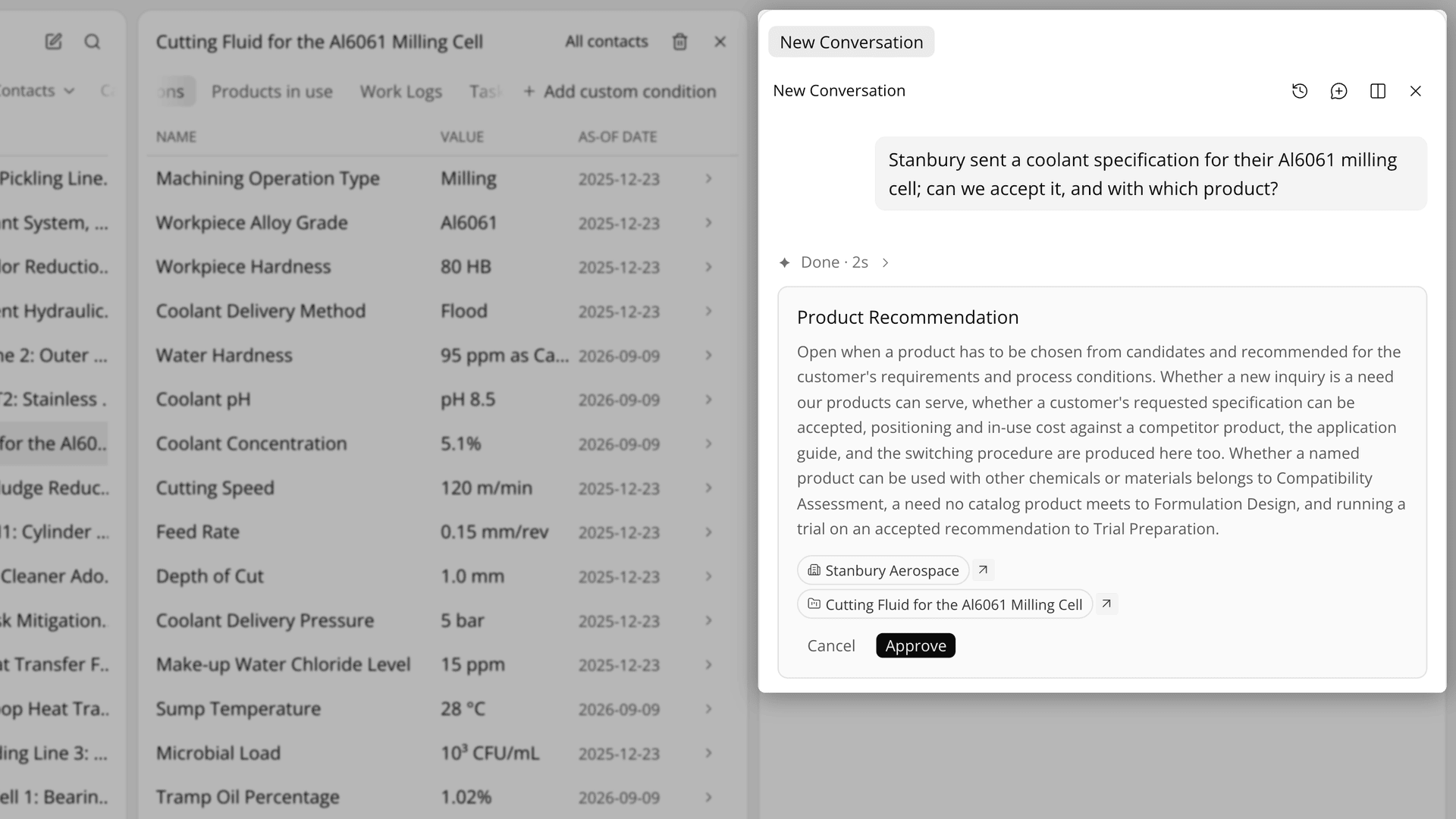
Figure 1. Nothing runs until you approve the card, which names the customer account and the skill.
Follow the steps. They appear as numbered tabs, 01, 02, 03. A finished step opens on its conclusion, with sections such as a table comparing candidate products folded underneath.
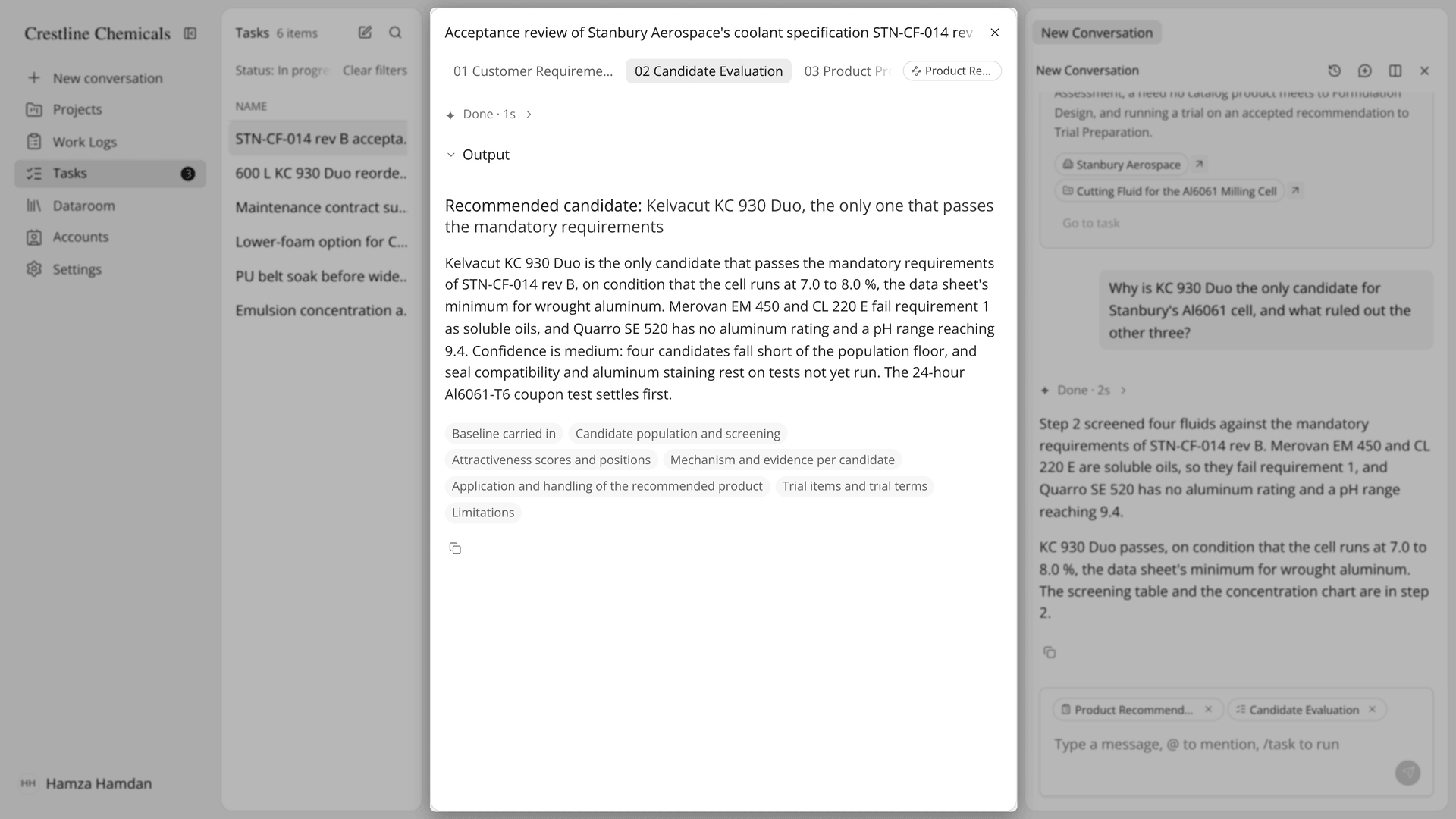
Figure 2. A finished step shows the comparison its conclusion rests on.
Answer the questions. The document step, for example, asks before it writes which candidates the customer should see, how much evidence to include and what next step to propose. The step is marked Answer required until you press Submit answers.
Review the final document. Type corrections into it, or select a passage and ask the AI to change just that part. If the whole draft is off, press Request changes, write a note in What to change and press Rerun with feedback. When it is right, press Approve and finish.
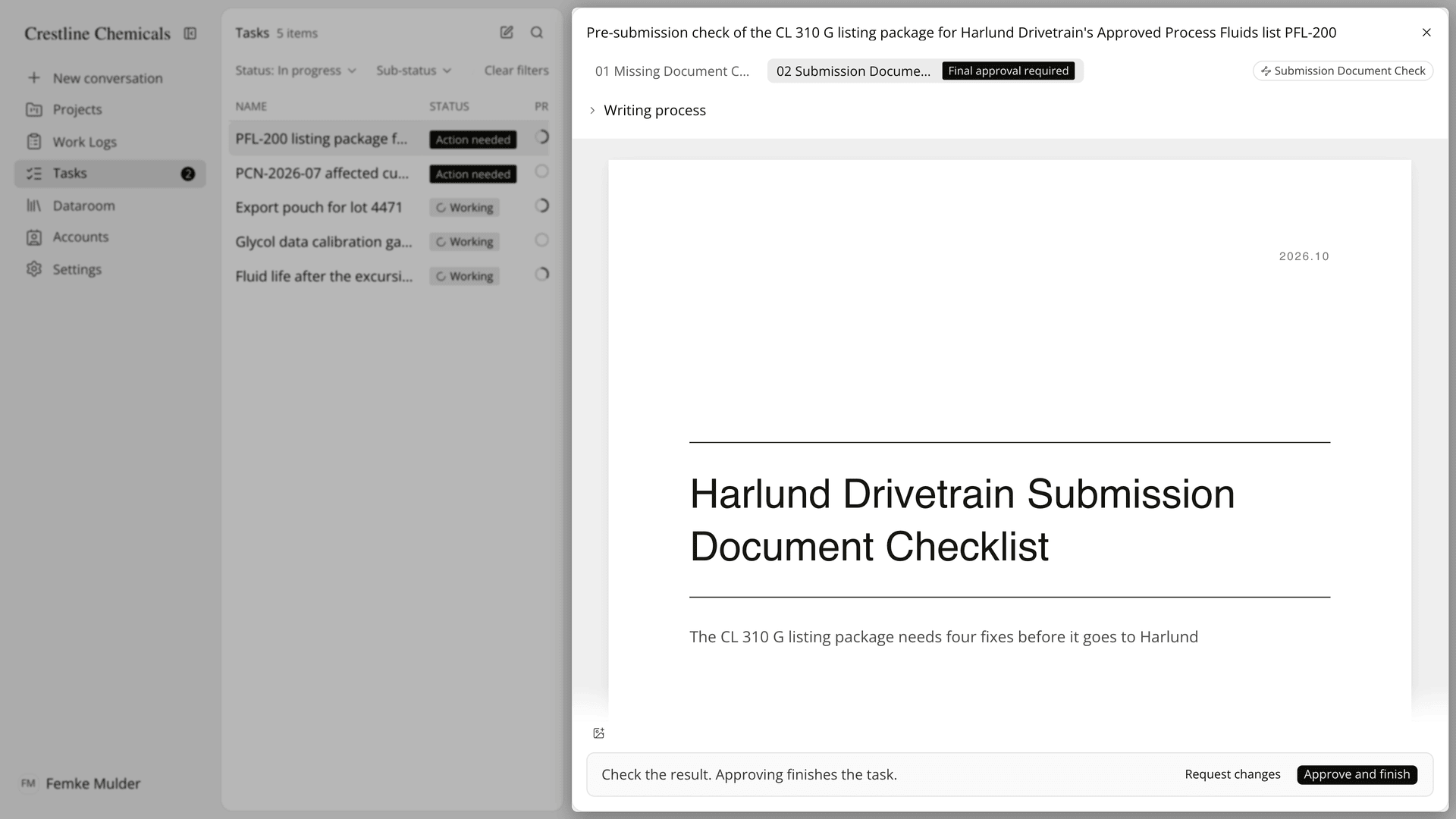
Figure 3. The last step waits for a person before the document is filed.
The Academy video follows one product recommendation task for a sample account: the request in AI Chat, the step results, the questions, the final approval and the filed PDF in Deliverables.
What should an AI tool for TDS and SDS questions show the technical team?
An AI tool that answers customer technical questions from a supplier's own TDS and SDS should show which documents it read, how it reached the answer, and where a person signed off. A reply drawn from general knowledge gives a technical service lead nothing to check before it reaches the customer.
Tasks is built around those three points. The steps read the records your team keeps in Lubinpla: accounts, projects, work logs, and the data sheets and certificates you upload to the Dataroom. While a step runs, its reasoning and the records it looks up appear as they happen, and a finished step keeps its supporting sections under the conclusion. If a conclusion is unclear, you can select a passage in a step's result, press Ask, and AI Chat answers from the steps the task actually ran.
Sign-off is explicit. With the default setup, the task waits for approval before it starts and at the final document, and the step records Approved by with the approver's name and the time.
On the internal benchmark published on the Tasks page, the Product Recommendation task, which ends in a Product Proposal, cut hands-on time per case to under an hour, against about 4.6 hours for a general agent on the same cases and documents.
How does a Tasks product recommendation compare with email and spreadsheets?
A product recommendation run as a task keeps the conditions, the candidates, the answer and the approval in one record, where email and spreadsheets keep them in several places. The table below sets each part of the work against the two ways of doing it:
Work | Email, shared folder and spreadsheet | Lubinpla Tasks |
|---|---|---|
Collect the customer's conditions | Rebuilt from mail threads and old site sheets | Steps read the account, project and work logs |
Find the current TDS and SDS | Search the shared folder and hope the revision is right | Steps read the files in the Dataroom and Deliverables |
Compare candidates | A spreadsheet only its author can explain | A step conclusion with the comparison table under it |
Decide what the customer sees | Decided while writing the email | Answered as questions before the document is written |
Check the draft | Forwarded to a senior engineer, then wait | Final approval required, Request changes or Approve and finish |
Keep the answer | Sent mail in one person's inbox | Approved PDF filed in Deliverables |
Hand over the account | Forward the email folder | Change the assignee with Edit assignees |
The row that matters most for a technical service lead is the check. In the email workflow, a draft waits in a senior engineer's inbox with no record of what was checked. In a task, the final step waits as Final approval required, any teammate in the organization can approve it, and the step shows who approved it and when.
The handover row matters when an account changes hands. If a rep is away, Edit assignees in the task's row menu passes the task to a teammate, who opens the same steps, answers and approved document instead of a forwarded email folder. When the customer asks the same question again, the filed document is the answer already given.
What does the Tasks feature not do in a product recommendation?
The Tasks feature cannot use customer records your team has not put into Lubinpla, and it does not replace the judgment of the person who approves. A step reads accounts, projects, work logs, and files in the Dataroom and in Deliverables. If the current SDS revision was never uploaded, the step cannot use it, and the recommendation is only as current as those records.
Approval points depend on your organization's setup. By default, a person approves the task before it starts and approves the final document, while the steps in between hand their results to the next step without waiting. Your organization can make a middle step wait for approval as well, or switch off the start or final approval for a skill.
After Approve and finish, the document can no longer be sent back or changed, so make your edits first. Re-instruct AI runs the whole task again from the first step and deletes the earlier steps and their messages permanently.
A recommendation is not a qualification. Lab checks and a field trial still decide whether the product works on the customer's line. If you already use Lubinpla, the Tasks guide in the app covers retries, re-instruction and the team task list in full.